---
title: "Skip Copy Task(s)"
url: "https://help.manageartworks.com/en/article/skip-copy-tasks"
language: "en"
last_updated: "2025-08-18T13:14:46.096Z"
---
# Skip Copy Task(s)
|  | **Note:** Skipping a copy task works slightly differently from skipping ordinary tasks. For details on skipping ordinary tasks, refer to **Skip Task(s)**. |
| --- | --- |
You can skip a task at any time—before or after the project starts—if it is not required for that specific project..
|  | **Note:**
- You cannot skip the current active copy task.
- For **In-progress** projects, a copy task can be skipped by:
- The assigned participants
- The initiators (users assigned to the Start activity).
- For assigned participants to skip a copy task in an in-progress project, the **Edit Stakeholder** setting must be enabled for that copy task.
- Before project initiation, initiators can skip copy tasks. |
| --- | --- |
## To Skip a Copy Task
1. Log in to your [ManageArtworks](https://app.manageartworks.com/karomi/global/build/login) account.
2. If you are skipping a copy task in an in-progress project:
1. Navigate to **Project Views**.
2. You can skip the copy task from any view which lists in-progress project. To switch views, click the hamburger menu and select the desired view.
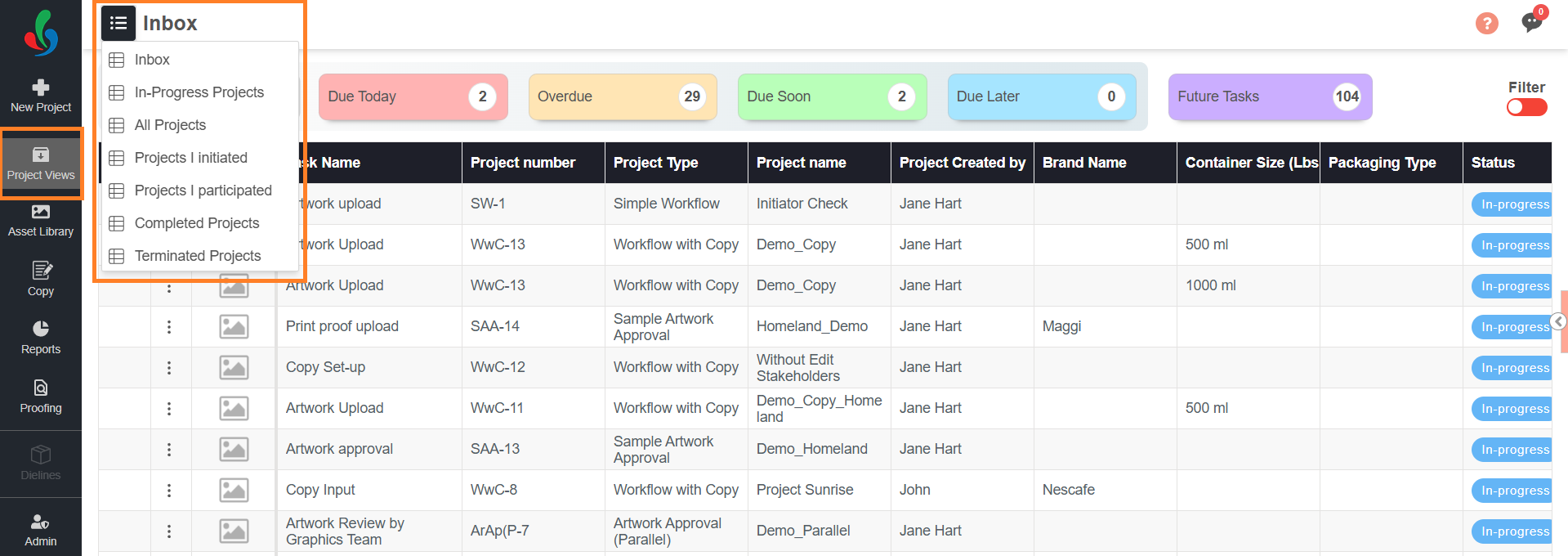
3. Open the desired in-progress project and go to the **Tasks** tab.
4. In the Skip column, select the checkbox for the copy task(s) you want to skip. The copy task name will display with a strike-through.
**Note:** If the checkbox is greyed out or disabled, click the **Edit Form** button and then select the checkbox. For assigned participants to skip a copy task, make sure that the **Edit Stakeholder** setting is enabled for that task.
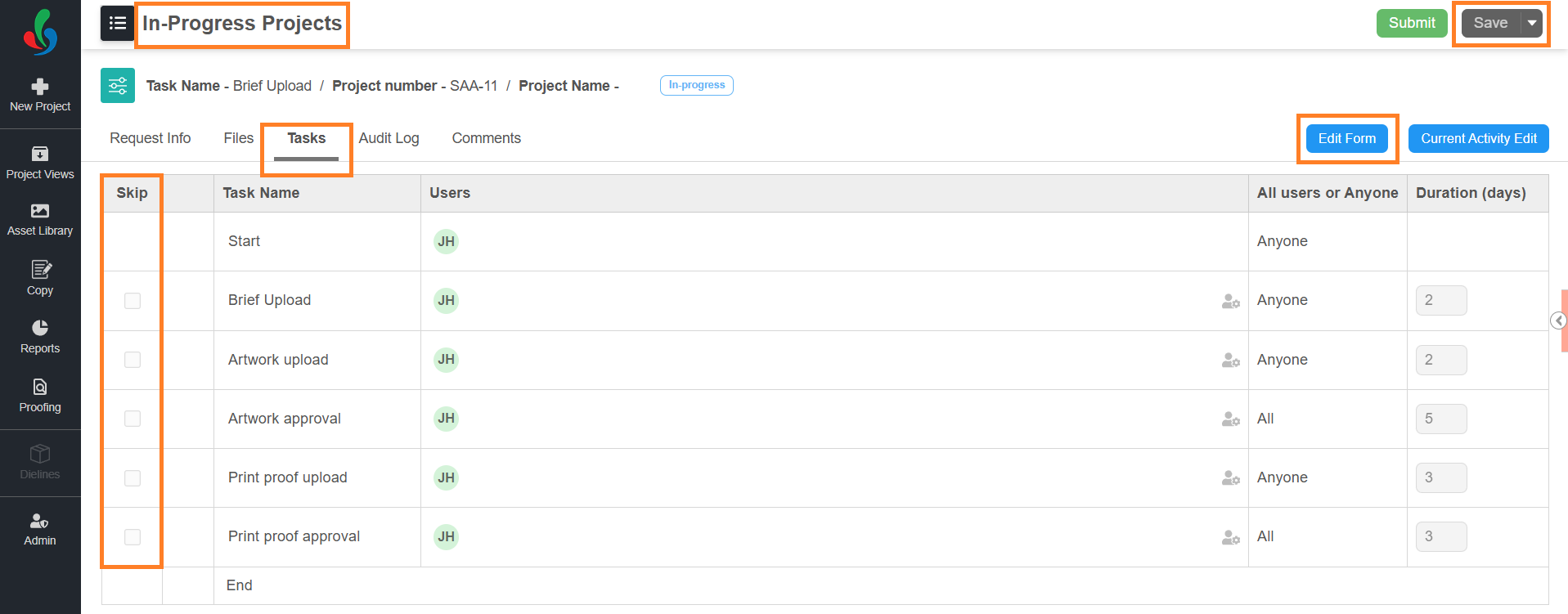
5. Click **Save** to skip the task.
3. If you are skipping a copy task before project initiation:
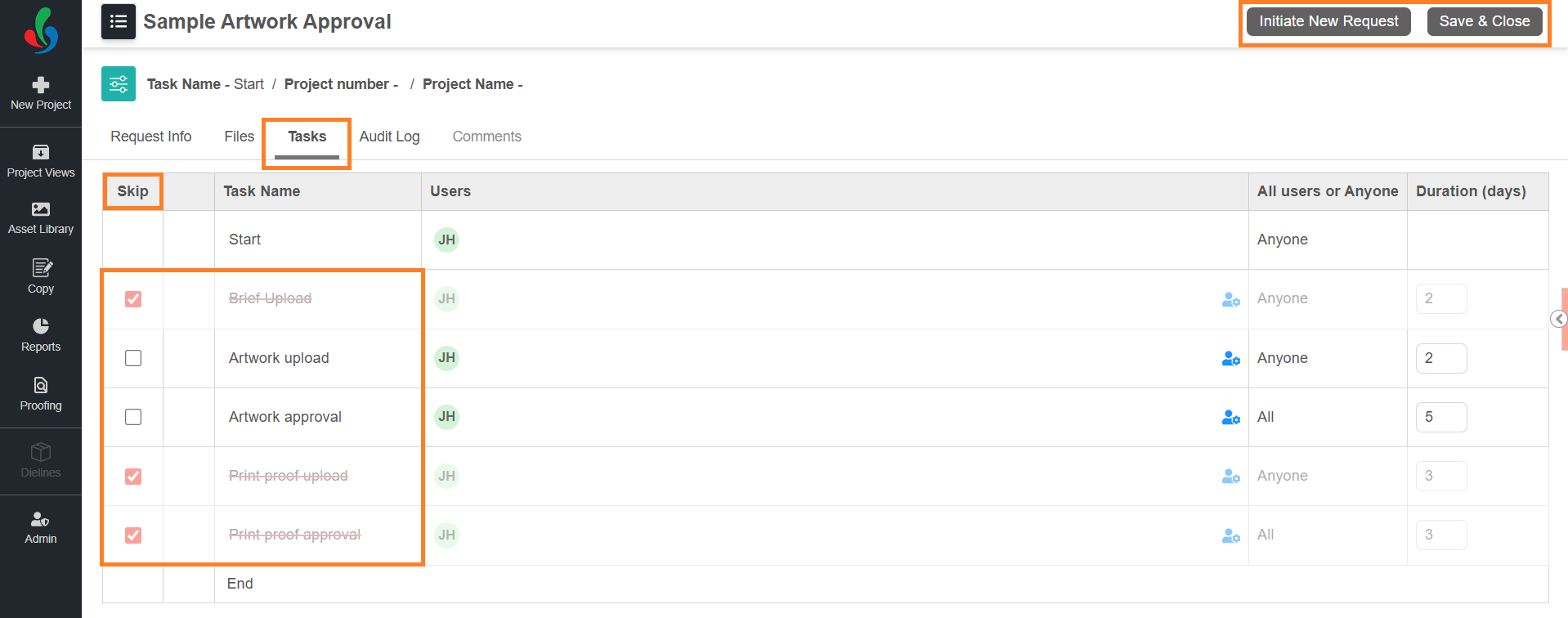
1. In the project and go to the **Tasks** tab.
2. In the **Skip** column, select the checkbox for the task(s) you want to skip. The task name will display with a strike-through.
3. Click **Initiate New Project** or **Save & Close** to skip the task.
### Skip Rules for Copy Tasks
| **Task Type** | **Skip Rules** |
| --- | --- |
| **Copy Set-up Task** | - Can be skipped only if **Copy Input** and/or **Copy Approval** tasks have *edit rights* to add and assign users to the elements. |
| **Copy Input Task** | - If skipped, **all subsequent copy tasks** will also be skipped automatically.
- You can unskip “**View-Only**” copy tasks, but all other copy tasks will remain skipped if Copy Input is skipped. |
| **Copy Approval / Translation Approval Tasks** | - Cannot be skipped unless their associated **Input Task** is also skipped. |
| **Translation Input/ Approval Tasks** | - If **Translation Input** is skipped, the corresponding **Translation Approval** will also be skipped.
- If translation language is selected in **Copy** tab, translation tasks cannot be skipped. |
| **Artwork Review Copy Task** | - Cannot be skipped unless the **Copy Input Task** is skipped. |
| **Only View Copy Task** | - Can be skipped independently |